FAQ
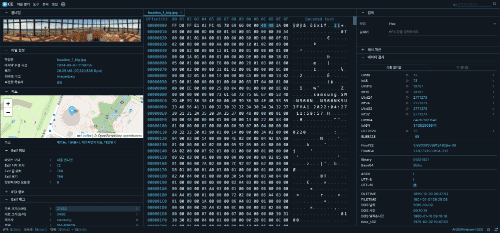
Q. What features are included in the Web-based Hex Viewer?
It visualizes raw binary data in hexadecimal format for deep inspection. Features include instant offset navigation and automatic data interpretation for various types like UInt, Float, and Time, providing a professional forensic analysis environment.
Q. Can it only analyze image files?
No. While the EXIF and chunk analysis features are optimized for image files, the Hex Viewer and Hash Calculator support all types of binary files, including executables (EXE), documents, and compressed files.
Q. Can I search for specific strings or hexadecimal values within a file?
Yes, we support powerful search functionalities based on Text (ASCII), Hexadecimal (Hex), and Offset. It provides a case-sensitive option and allows you to instantly find desired data even in large files, quickly navigating up to 1,000 results.
Q. Which file hash algorithms are supported?
We support all standard algorithms including MD5, SHA-1, SHA-256, and SHA-512 for verifying file identity and integrity. Large files are processed instantly via local WASM technology.
Q. Can it handle large images or binary files?
Yes. Utilizing WebAssembly (WASM) for efficient memory management, the tool can load and analyze files over several hundred MBs in real-time without browser freezing.
Q. Are my photos or analysis data stored on a server?
No, your original photos or file data are never stored on our servers. File analysis is processed 100% locally within your device (browser). However, only when you explicitly request features like 'Map View' or 'Show My IP', the minimum necessary data (GPS coordinates, IP) is temporarily sent to external APIs (like OpenStreetMap) to provide the service, and this data is also not stored on our servers.
Q. Can it extract prompts from AI-generated images like Stable Diffusion or NovelAI?
Yes, extraction is possible in most cases. It scans and displays text data such as prompts, model details, and seeds recorded in iTXt or tEXt chunks within PNG files. You can check metadata generated from major platforms like WebUI, ComfyUI, and NovelAI, though some information may be missing depending on the image generation method or compression/conversion process.
Q. Is it possible to check metadata for corrupted or broken images?
Yes, it is possible because it uses binary stream scanning instead of standard image rendering methods. As long as the file header (IHDR) or metadata chunks remain intact, text information can be recovered even from broken images.
Q. Does it support screenshots from mobile devices like iPhone or Android?
Yes, it perfectly analyzes eXIf and standard PNG chunks included in mobile device captures, providing detailed information such as device info, capture timestamps, and resolution.
Q. Can it be used on macOS or mobile devices besides Windows?
Yes, it can be used instantly without any program installation on all devices (Windows, macOS, Linux, iOS, Android, etc.) that run a web browser. As long as you have an internet connection, it provides a powerful forensic environment anytime, anywhere.
Q. Can I open multiple files simultaneously for comparison or analysis?
Yes, we support a Multi-tab feature allowing you to open multiple files at the same time and switch between them for analysis. Additionally, once calculated, hash values and search results are automatically cached in the browser, so they are displayed instantly without delay upon re-checking.
Use Cases
• Verify file integrity and detect data tampering via hash (MD5, SHA-256, etc.) calculations
• Recover hidden prompts and parameters from AI-generated images (Stable Diffusion, etc.)
• Inspect GPS location information and detailed shooting metadata (EXIF) in digital photos
• Prevent privacy leaks by checking sensitive metadata before sharing photos on social media
• Detect steganography and hidden data through deep PNG chunk structure analysis
• Perform real-time binary Hex analysis and offset tracking for security experts
• Optimize web performance by validating image compression (Deflate) and interlace settings
• Analyze headers and signatures of suspicious files (malware, etc.) in a safe, serverless local environment
• Practice file structure identification and reverse engineering for computer science and information security majors
• Utilize the Data Inspector feature for instant Endian (Little/Big) conversion and diverse data type (Int, Float, Time, etc.) verification
• Perform instant digital forensics directly within an internet browser environment
• Conduct real-time binary (Hex) comparison analysis between normal and suspicious files utilizing the Multi-tab feature